
Dashboard & Analytics
OneGateway provides the Dashboard and Cost & Usage pages to help you understand model activity, spending, and usage trends. Dashboard is under Overview in the left navigation, and Cost & Usage is under Analytics.
| Page | What to review |
|---|---|
| Dashboard | Whether recent calls are healthy, how cost and usage evolve, and which users or departments consume the most |
| Cost & Usage → Cost | How much was spent on a selected day or month, and which models and users it came from |
| Cost & Usage → Usage | Token usage, API request counts, and their distribution for a selected day or month |
Dashboard
Open Dashboard to review the summary cards, then use the trends and usage rankings to identify areas for further analysis.
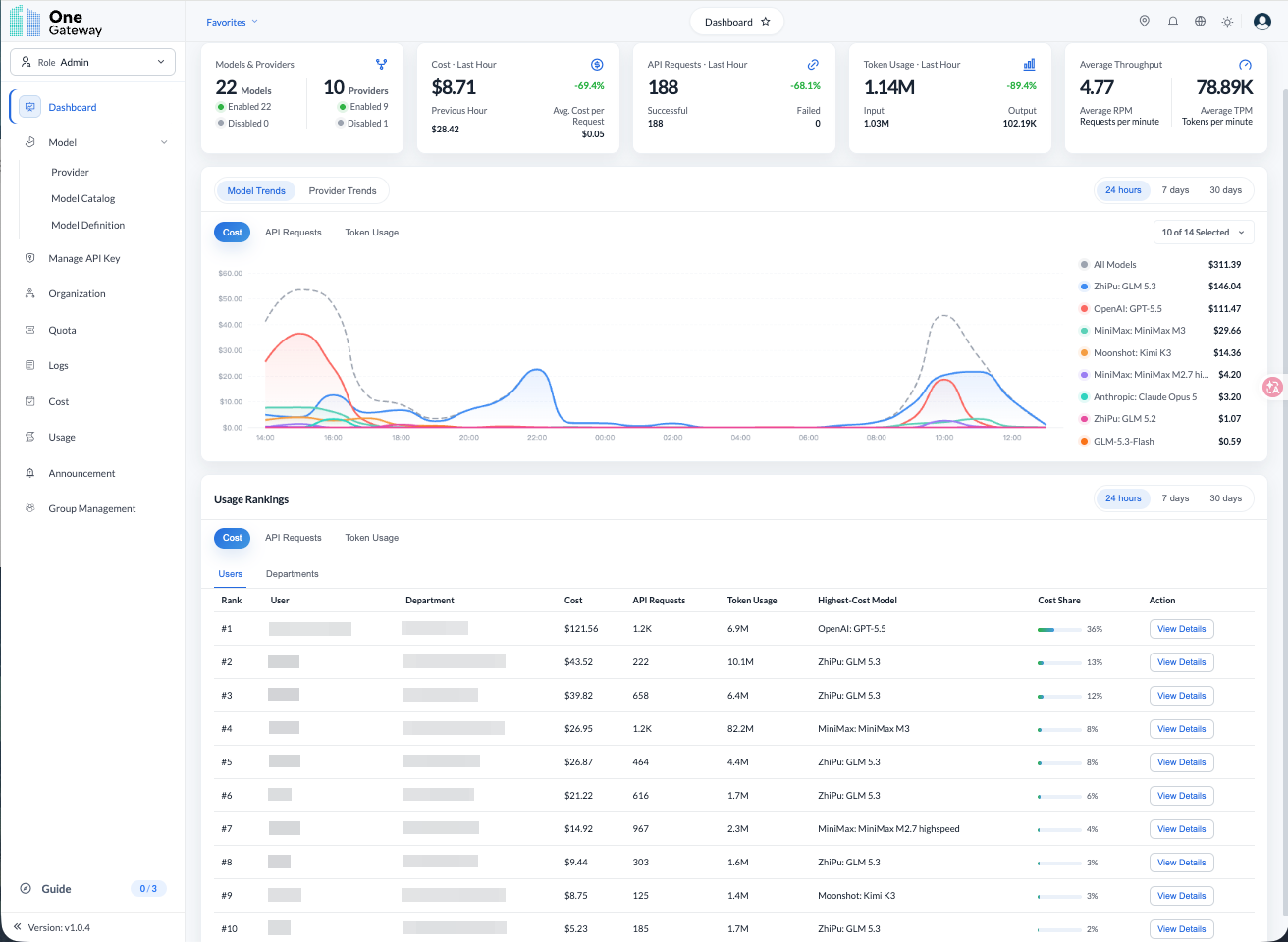
Summary Metrics
| Card | Contents |
|---|---|
| Models & Providers | Model and provider counts, including enabled and disabled counts |
| Cost - Last Hour | Spending in the last hour, plus Previous Hour spending and Avg. Cost per Request |
| API Requests - Last Hour | Request count, with Successful and Failed counts |
| Token Usage - Last Hour | Token usage, with input and output counts |
When spending or request volume changes, use the trend charts to locate the affected period. For failed requests, open Request Logs to inspect individual calls.
Model and Provider Trends
Switch between Model Trends and Provider Trends, then choose Cost, API Requests, or Token Usage.
- Select models or providers as the analysis dimension.
- Select the metric to inspect.
- Choose 24 hours, 7 days, or 30 days.
- Use the selector on the right (for example, "1 of 1 Selected") to choose which items to display (up to 5 at a time), then compare the chart and legend.
For example, to identify the models responsible for spending over the last week, select "Model Trends → Cost → 7 days" and compare their curves and amounts. The trend chart's period is separate from the "Last Hour" summary cards.
Usage Rankings
Usage Rankings shows the top 10 by Users or Departments, with Cost, API Requests, or Token Usage as the metric and 24 hours, 7 days, or 30 days as the period.
The user ranking shows the user, department, Cost, API requests, token usage, Most Used Model, and Cost Share. Click View Details to inspect the corresponding item. Align the period and metric before comparing rankings with the trend chart.
Cost & Usage
Open Analytics → Cost & Usage. The page has two tabs, Cost and Usage; Cost opens by default.
Cost
On the Cost tab, examine spending for a selected day or month and identify its main sources.
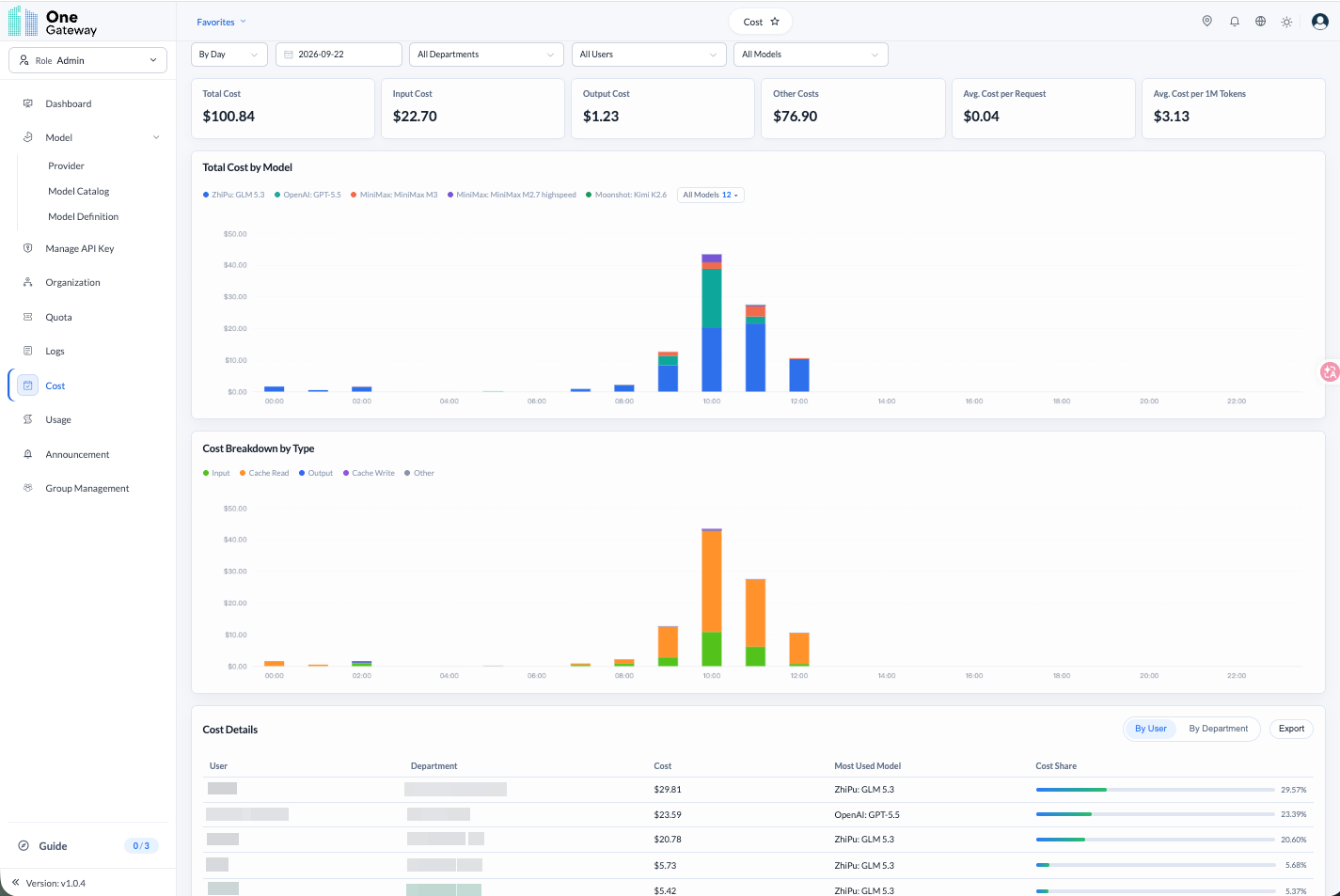
Select the Reporting Scope
- Choose By Day or By Month at the top left, then select the date or month.
- Filter by Department, User, and Model as needed. Selecting "All" aggregates everything within your permissions.
- Review the summary cards, charts, and details under the same filters.
Review Cost Components
The summary cards include Total Cost, Input Cost, Output Cost, Other Costs, Avg. Cost per Request, and Avg. Cost per 1M Tokens.
| Area | How to use it |
|---|---|
| Total Cost by Model | Compare spending across models and time periods to locate concentrated or rising costs |
| Cost Breakdown by Type | Review input, cache-read, cache-write, output, and other cost components |
| Cost Details | Switch between By User and By Department to review cost, the most used model, and cost share; click Export to export details |
For example, when daily spending rises, select that day and identify the main model in Total Cost by Model. Then filter by department or user to find the main contributors.
Usage
Switch to the Usage tab to review call volume and token distribution. Tokens are units models use to process text and do not correspond exactly to characters or words; API request counts measure calls—two different aspects of usage.
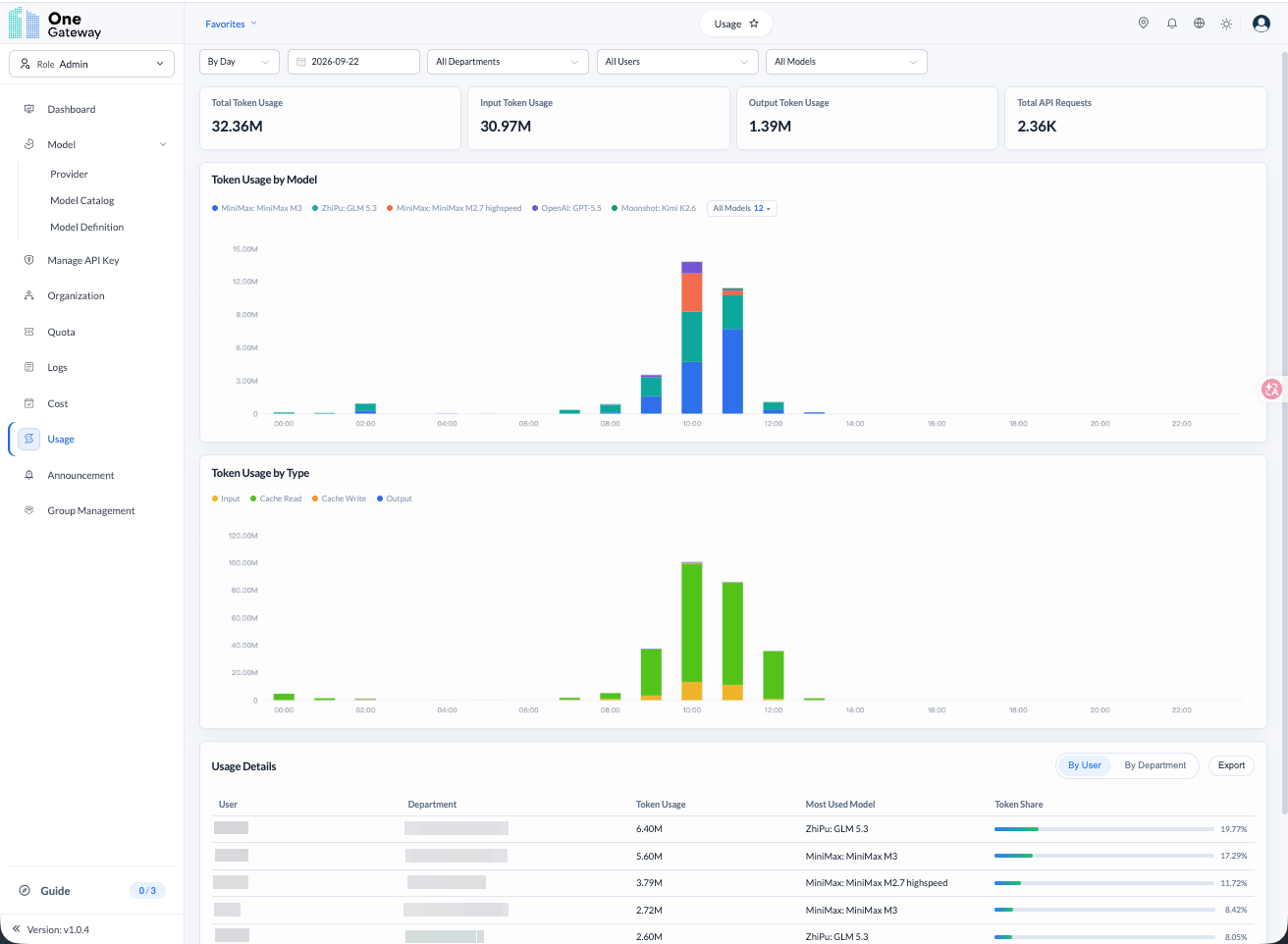
The Usage tab also supports By Day / By Month, with date, department, user, and model filters.
| Area | Contents |
|---|---|
| Summary cards | Token usage overview, including input tokens, output tokens, and total API requests |
| Token Usage by Model | Token usage for each model across time periods |
| Token Usage by Type | Input, cache-read, cache-write, and output token distribution |
| Usage Details | Token usage, the most used model, and Token Share by user or department, with export support |
For example, to review a department's monthly activity, choose "By Month," select the month, and filter by department. Use the summary cards for overall volume, the model chart for the main models, and the By User details to compare individual usage.