
Semantic Cache
Overview
The Semantic Cache lets identical or semantically similar requests reuse existing answers, reducing repeated model generation calls. For example, "The product is unsatisfactory—how do I request a refund?" and "I want a refund after purchase—what should I do?" may reuse the same answer.
It suits businesses with stable answers, such as FAQs and product consultations. Use it cautiously for real-time information, personal state, and tasks that need a fresh answer every time. A semantic hit returns the previous answer as-is; it is not rewritten for the new question.
This differs from provider prompt caching: prompt caching usually still runs model generation, with different accounting and billing treatment.
Prerequisites and Modes
An administrator must first enable the cache and configure storage. Requests also need a valid single API credential and a resolvable cache key, and the message count must not exceed the history threshold (3 messages by default—messages, not rounds).
| Mode | How it works | What you need |
|---|---|---|
| Exact match only (Direct) | Reuses answers to requests that are identical after normalization | Cache storage |
| Exact + semantic match (Semantic) | Exact match first; on miss, searches by semantic similarity | Cache storage, an Embedding service, and a matching vector dimension |
Embedding converts text into vectors for semantic comparison. Semantic lookup adds call overhead; on a miss the upstream is still called, so low-hit-rate workloads are not necessarily faster or cheaper.
Supported APIs
| API type | Path | Support |
|---|---|---|
| OpenAI format | POST /v1/chat/completions | Streaming and non-streaming |
| Anthropic format | POST /v1/messages | Streaming and non-streaming |
| OpenAI Responses format | POST /v1/responses | Stateless requests, including streaming |
Requests using background: true, conversation, or a non-empty previous_response_id skip caching; /v1/responses/compact does not participate.
Quick Verification
Confirm the cache is enabled, then replace the endpoint, API key, and model with your actual values:
curl -i 'https://your-gateway.example.com/v1/chat/completions' \
  -H 'Authorization: Bearer <ONEGATEWAY_API_KEY>' \
  -H 'Content-Type: application/json' \
  -H 'hcd-og-cache-key: faq-demo' \
  -d '{
    "model": "<MODEL_ID>",
    "messages": [{"role": "user", "content": "The product is unsatisfactory—how do I request a refund?"}],
    "temperature": 0
}'- First request: with no entry available, it returns
og-cache: MISS; the successful answer is written in the background. - Same request: retry after the write completes; a hit returns
og-cache: HITandog-cache-type: direct. - Similar request: with semantic mode enabled, rephrase to "I want a refund after purchase—what should I do?" keeping everything else the same. Above the threshold, the hit type is
semantic.
Retrying immediately after the first response may still MISS; similar phrasings are not guaranteed to hit. See the troubleshooting table.
Administrator Configuration
Configuration applies per target Gate instance. If the console integration is available, configure the instance there; to call the endpoint directly, use separate Gate administrator credentials and follow the complete configuration procedure.
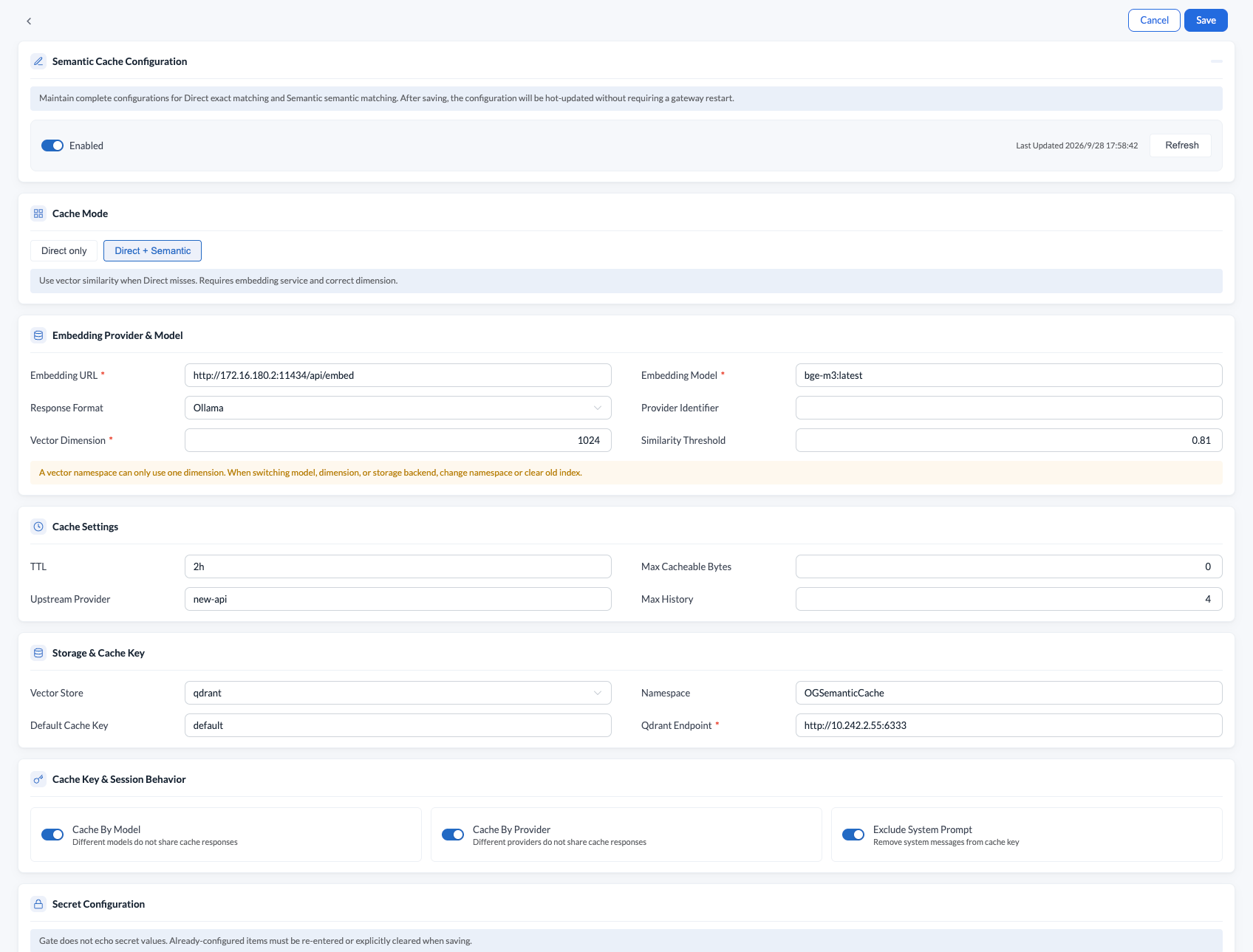
- Configure cache storage and the namespace to separate test from production.
- Choose the mode: leave
embedding_urlempty for exact-only mode; for semantic mode, fill in the full Embedding endpoint, format, model, key, and the actual vector dimension. - Set the policies below, validate and save, then run the quick verification.
| Setting | Default | Description |
|---|---|---|
| TTL | 5m | How long new entries stay valid |
| Similarity threshold | 0.8 | Higher is stricter; not an answer accuracy rate |
| History threshold | 3 | Counted in messages; requests above it skip the cache |
| Default cache key | empty | Used when a request provides neither a business key nor a tenant header |
| Isolate by model and provider | On | Different models or providers are cached separately |
| Exclude system prompt | Off | By default the system prompt participates in matching and history counting |
Keep the default isolation rules; ignoring the system prompt may reuse answers produced under a different persona. When switching Embedding models, use a new namespace; dimension changes also require a matching collection or index.
Cache configuration supports hot updates; on failure the last valid configuration is kept and in-flight requests continue with it. See the technical reference for storage fields, configuration examples, and save error handling.
Controlling the Cache per Request
| Request header | Usage |
|---|---|
hcd-og-cache-key | Specifies the business cache space, for example product-faq:v1 |
hcd-og-ttl | Sets the TTL for new entries, such as 30s, 5m, or an integer number of seconds |
hcd-og-threshold | Sets the semantic threshold, greater than 0 and at most 1 |
hcd-og-cache-type | direct exact only; semantic semantic only; default tries exact first, then semantic |
hcd-og-no-store | true allows reads but does not store this answer |
A request-level TTL does not change the expiry of an entry that was already hit. Invalid control values fall back to default behavior; a semantic-only request skips the cache when no Embedding service is configured. See the technical reference for the complete parsing rules.
No-Store can still return an existing answer
hcd-og-no-store: true does not disable cache reads or Embedding lookups. To force a freshly generated answer, use a new business cache key or ask an administrator to clear the relevant entries; if the new answer should not be stored either, combine the new key or purge with No-Store.
Cache Spaces and Matching Boundaries
The cache space is selected in this order: the hcd-og-cache-key header → the tenant ID from hcd-og-tenant-id → a user ID already set in the gateway context (user:<user-id>) → the configured default cache key. Caching is bypassed only when every source is empty. The user-ID fallback applies only when that context value is available.
hcd-og-tenant-id is a supported Gate request header identifying a business tenant, not a separate required cache-key field. To distinguish a business scenario or answer version explicitly, use the higher-priority hcd-og-cache-key, for example product-faq:v2.
Different API credentials or cache keys do not share entries; different endpoints and streaming modes are also cached separately. The model, provider, generation parameters, tools, attachments, and other fields all affect matching—Gate does not compare only the question text. Exact matching normalizes text; it is not a byte-for-byte comparison of the raw request.
hcd-og-tenant-id is a caller-set business identifier and cannot replace tenant authorization. When multiple users share one API credential, a trusted application should set the business key and tenant header.
See the technical reference for credential forms, normalization, and matching details.
Credential Validation and Revocation Checks
When an upstream URL is configured, credential validation before cache lookup is enabled by default. Successful validation results are cached for 5 minutes by default. After disabling a key or account, confirm configuration sync and verify that both requests that previously hit the cache and requests forwarded upstream reject the old credential. Neither a console toggle nor the validation cache lifetime guarantees when revocation takes effect across all paths. If answers are still returned, ask an administrator to check sync and credential validation state.
Lifecycle and Cleanup
Successful answers are written in the background; streaming answers must finish successfully—interrupted answers are not stored. Hits do not renew entries, and changing the default TTL does not expire old entries immediately. Stopping or restarting Gate does not proactively delete backend entries; whether storage survives a restart depends on its persistence configuration.
Cleaning the Cache
When knowledge changes, switch to a versioned cache key—for example, product-faq:v1 to product-faq:v2—or have an administrator clean up:
| Method | Scope |
|---|---|
| By entry ID | Removes the answer for the given og-cache-id |
| By cache key | Removes entries under that business key in the current namespace, possibly spanning multiple API credentials |
After removing one entry, other similar entries may still hit, and in-flight requests may write new ones. See the technical reference for the complete cleanup commands, result verification, and configuration changes and restart behavior.
Observing Results and Troubleshooting
Check the response headers first:
| Response header | Meaning |
|---|---|
og-cache | HIT on a hit; MISS when the lookup ran but found nothing |
og-cache-type | Hit type: direct or semantic |
og-cache-id | ID of the hit entry, or the candidate write ID on MISS; a candidate ID is not guaranteed to be saved |
og-cache-similarity | Similarity on a semantic hit |
Administrators can view hit summaries and request logs; this requires the logging plugin and MySQL log storage. The overall hit rate is (exact hits + semantic hits) divided by all persisted completed requests, including those that skip the cache. Logs and statistics may lag due to asynchronous writes.
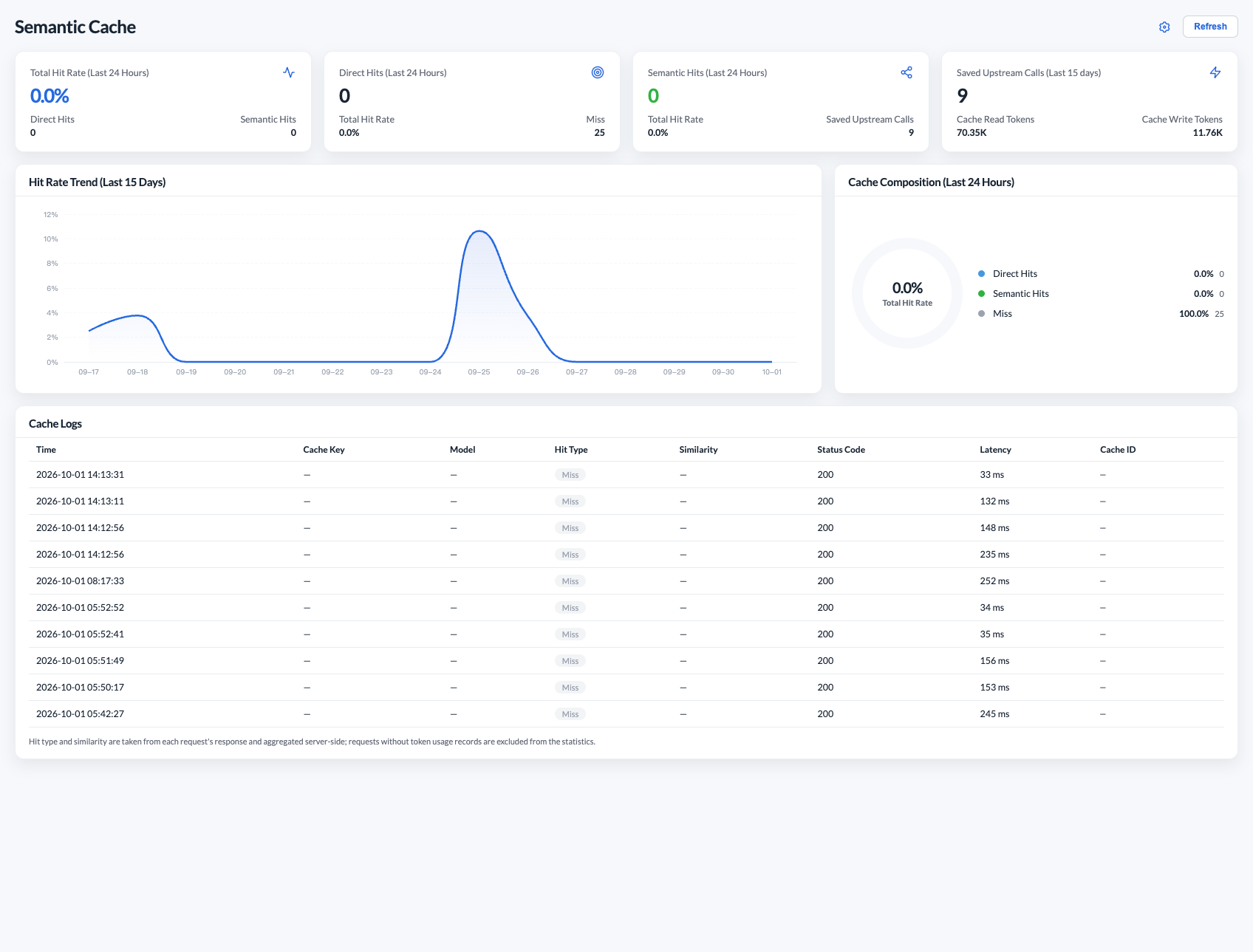
Cached token statistics and the historical usage in replayed responses do not represent this call's upstream consumption and cannot directly compute this call's charge. See the monitoring reference.
Troubleshooting by Symptom
| Symptom | Check first |
|---|---|
No og-cache header | Whether enabled, the endpoint, credential, cache key, message count, and whether the proxy strips response headers |
| Same request keeps MISSING | Whether the background write succeeded, TTL, credentials and parameters of both requests, No-Store |
| Only semantic misses | Embedding configuration, actual dimensions, matching boundaries and threshold; a MISS is not guaranteed to return a similarity |
| HIT but still slow | Credential checks before the cache and end-to-end latency; cache lookup time does not include credential probing |
| Cache works but monitoring is empty | logging, MySQL, filter ranges, and write delay |
| Old answer returned after cleanup | Another entry was hit, in-flight writes, storage visibility; for knowledge upgrades, switch to a versioned cache key |
Lowering the threshold may increase false hits. First confirm with real business questions that the answers are appropriate to reuse, then adjust. For configuration save failures and other administration issues, see the detailed troubleshooting guide.
FAQ
Does the Semantic Cache always reduce latency and cost?
No. On a hit it reuses an existing answer, saving the business model's generation call. But semantic lookup itself calls the Embedding service, and on a miss the business model is still called—so low-hit-rate workloads can be slower and more expensive. Prefer it for FAQ-style businesses with stable answers, and evaluate with hit rate and end-to-end latency.
Why didn't the same question hit the cache?
The cache compares more than the question text: API credential, cache key, endpoint, streaming mode, model, and generation parameters all matter. The first answer is written in the background, so an immediate retry may still MISS; expired entries and No-Store also affect hits. First confirm the request meets the cache conditions, then check the troubleshooting table.
Does a similarity threshold of 0.8 mean an 80% accurate answer?
No. The threshold controls semantic similarity matching, not answer accuracy or confidence. Lowering it may increase hits, but may also let questions with different meanings reuse the same answer. A hit returns the previous answer as-is, without rewriting for the new question; validate with real business questions whether reuse is appropriate.
How do I force a fresh answer for one request?
Use an unused hcd-og-cache-key, or have an administrator clear the relevant entries. hcd-og-no-store: true only prevents storing this answer and still allows reading existing entries; to regenerate and not store, combine a new cache key with No-Store. Omitting the cache key header does not guarantee skipping the cache, because the tenant header or default cache key may still apply.
Do different users share cached entries?
Entries are not shared across different API credentials or cache keys. If multiple users share one API credential and the same cache key, they may reuse each other's answers; for isolation, have a trusted application set distinct business cache keys. The tenant header is only a business identifier and cannot replace authorization. See Cache Spaces and Matching Boundaries.
After a knowledge update or TTL change, do old answers expire immediately?
No. Changing the default TTL does not expire old entries, and hits do not renew them. When knowledge changes, switch the cache key from product-faq:v1 to product-faq:v2, or clean up the entries; after deleting one entry, other similar entries may still hit. See Cleaning the Cache.
Is a partially generated streaming answer cached?
No. A streaming answer is written only if it finishes successfully; interrupted partial answers are not stored. Streaming and non-streaming requests are cached separately, so toggling stream should not be expected to hit the other mode's entries.
Is the usage in a hit response this call's consumption?
No. The usage in a replayed response is historical data; it does not represent this call's upstream consumption and cannot be used to compute the charge. Cached token statistics likewise need to distinguish historical usage from actual billing.